Cin7’s Integration
Solve it today.
Home
Inventory Management Software
Cin7
...
Posted on 10 February 2021
By Hanno



This Cin7 integration enhancement eliminates an unnecessary step for Xero and QuickBooks Online users.
Cin7 allows for partial payments on individual sales orders. To clarify, with this new Cin7 integration enhancement, they no longer require you to enter invoice payment details manually. The process eliminates manual steps and saves you even more time.
What do you need to do to be able to use this feature?
If you use the Accounting Dashboard, nothing. You’ll see all reconciled invoice payments in the “Payments” section of your sales order. On the other hand, if you’re not currently using the Accounting Dashboard, get it from Cin7 App Store.
How does this update to Cin7 change the way you use it?
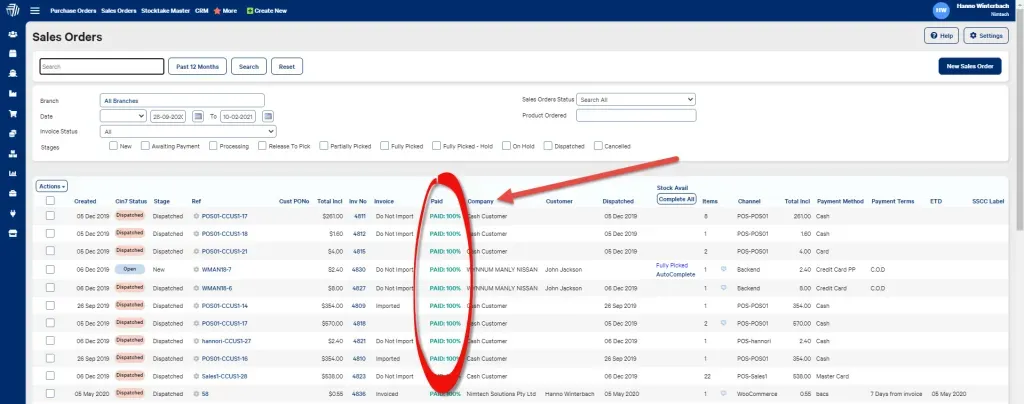
Until now, the payments from Xero or QuickBooks Online invoices would only appear in the main Sales Order section of the Sales module. As shown below.
Get the payment details you need from Xero, or from Quickbooks online.
Further, with this new Cin7 integration enhancement the payment details are automatically recorded under “Payment Type” in the corresponding order.
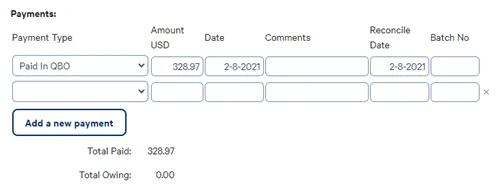
The Cin7 integration enhancement allocates payments to the sales orders. This eliminates the need for you to manually enter payment information in the Payments section of every order. We could all agree that Cin7 made a really good choice.
Please get in touch with us if you have any questions about Cin7, data migration, system implementation, expert consulting, operational support, design work, or integration with other add-ons.
Originally published here.
Created by Simon Eskow and modified for S4B and XeroHero by Hanno Winterbach February 09, 2021
Recent Posts
Stay informed with the latest news.


 Facebook
 Twitter
 LinkedIn
Features that set us apart

Meet our team
Insightful articles written by industry leaders

Tony Fred
Chief Executive Officer
Founder and chief visionary, Tony is the driving force behind the company. He loves to keep his hands full by participating in the development of the software, marketing, and customer experience strategies.