
Category: Cin7
Learn more about Cin7 and its features by utilizing articles, videos, and good practice.
Cin7
Solve it today.



How to Backup Your Sensitive Cin7 Core Data
1. Access Settings and Automation 0:01
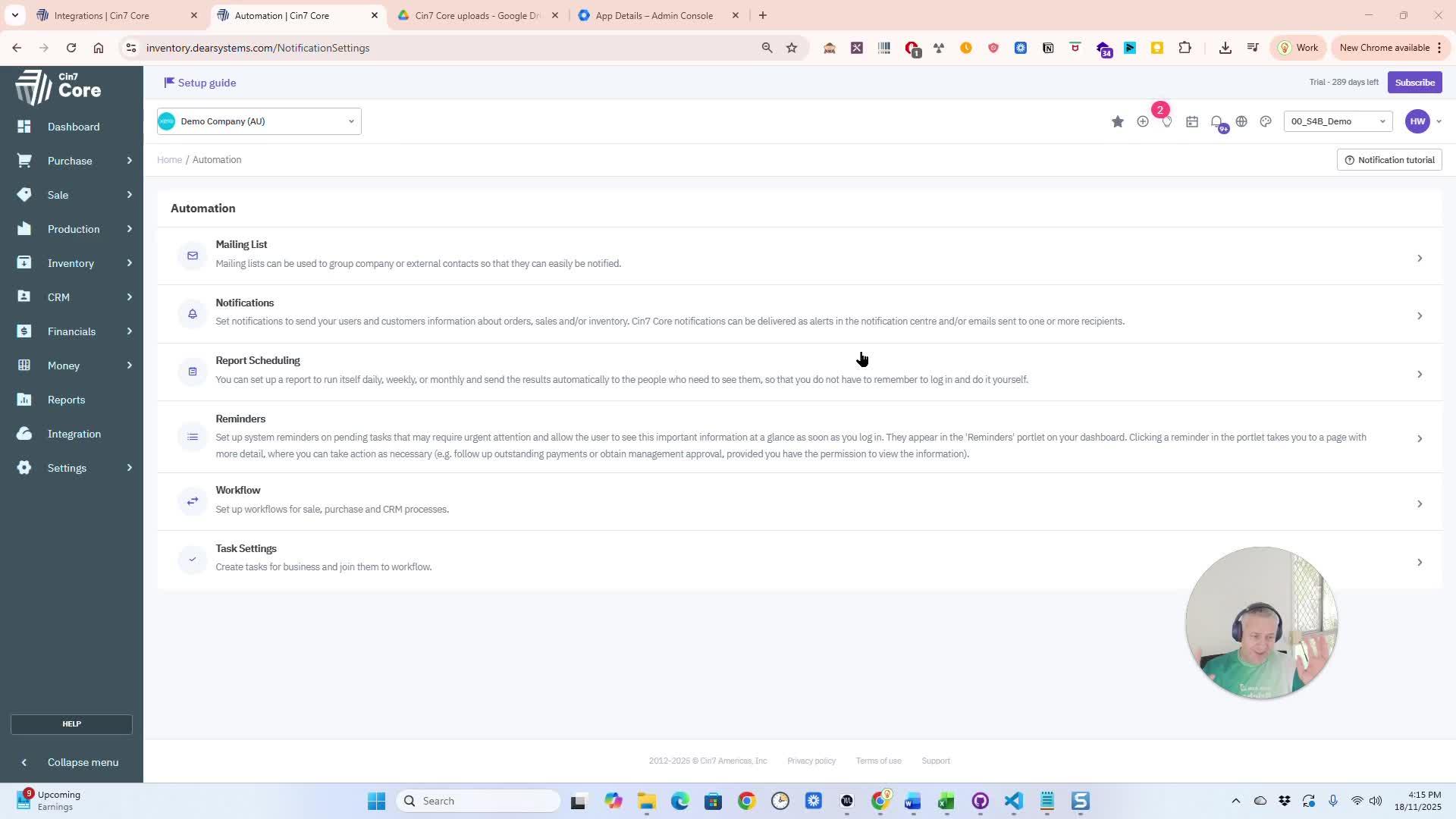
Configure your Automation
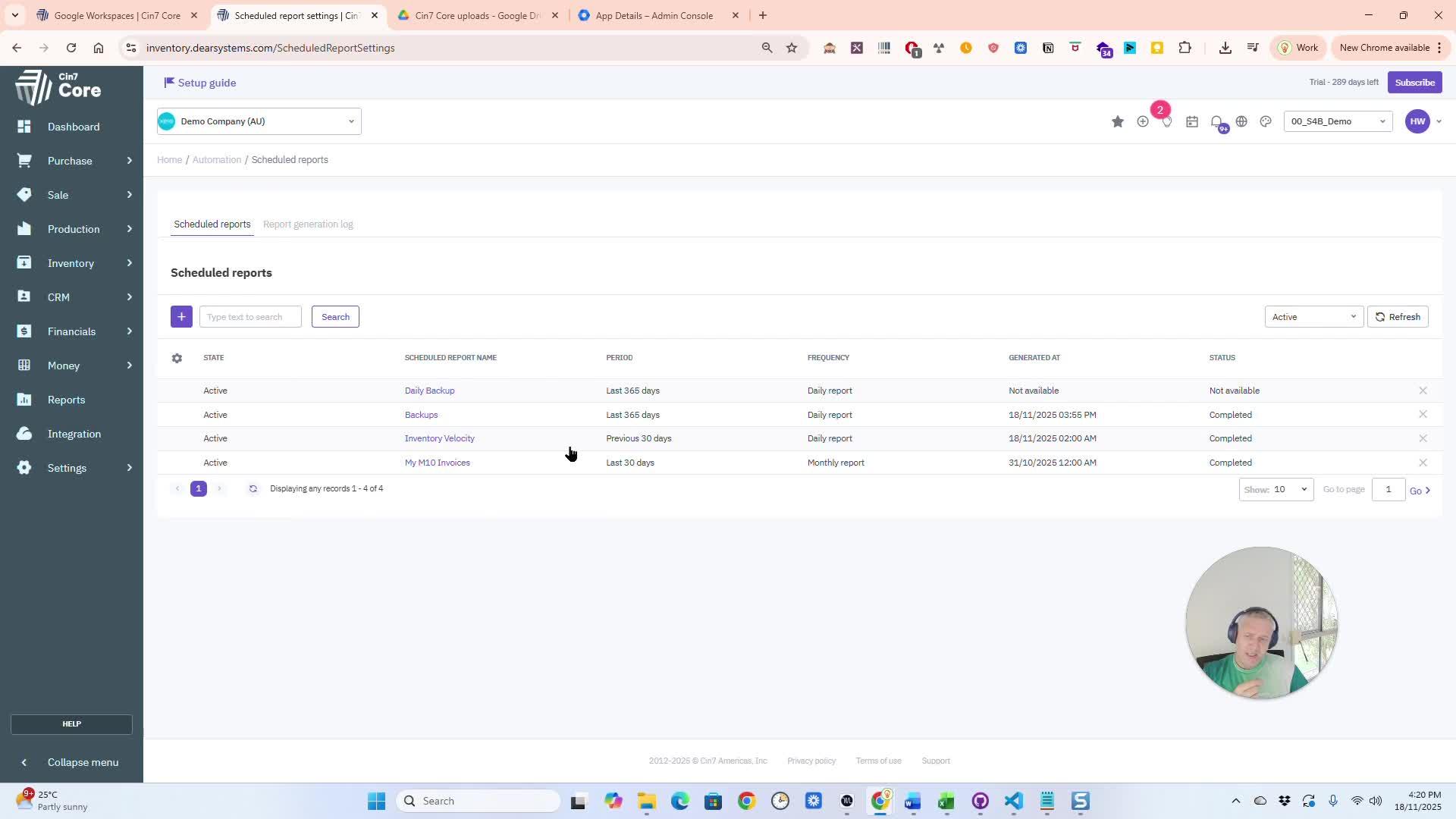
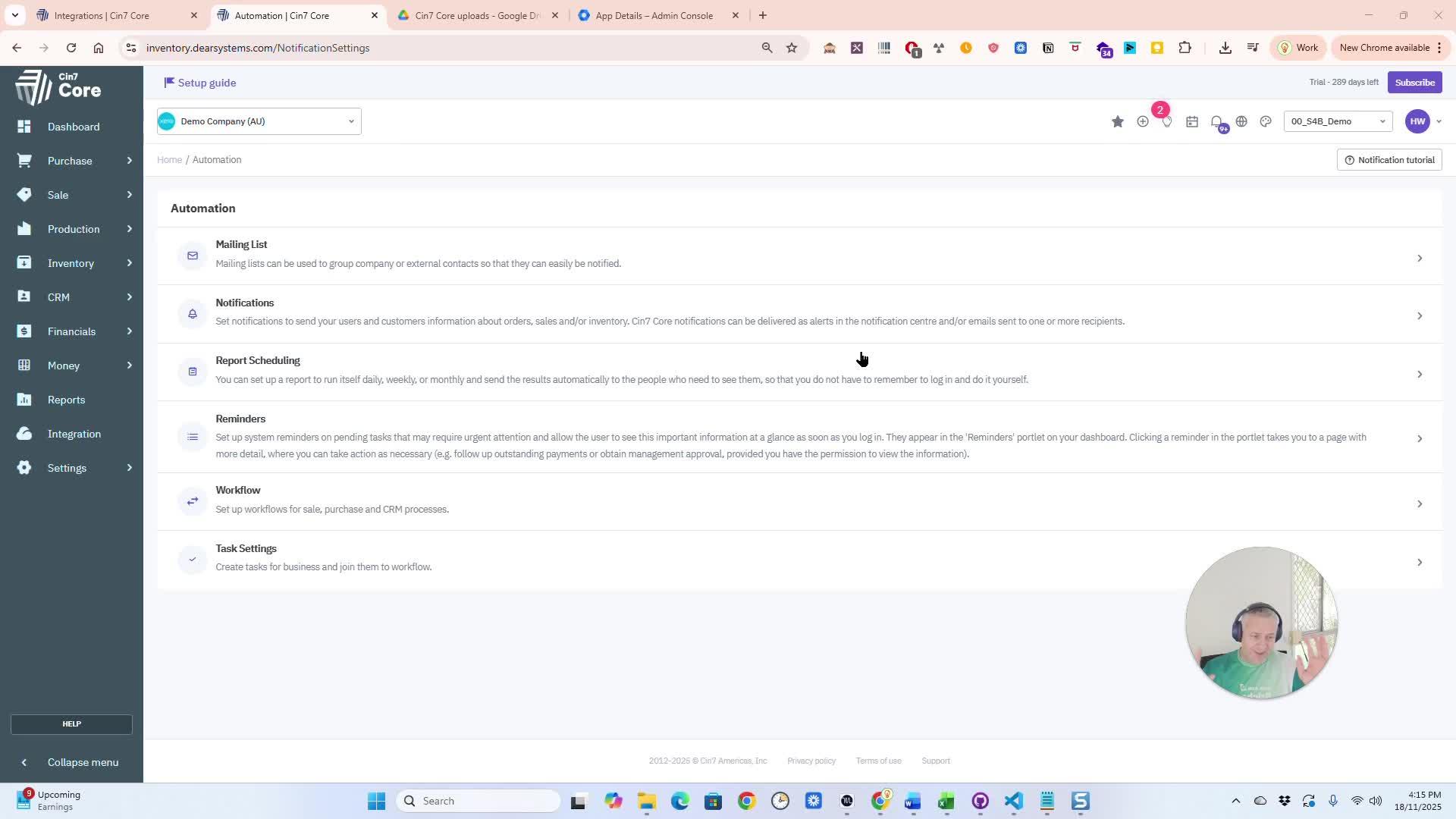
Click on Settings. Navigate to Automation. You may need to activate the automation module if it’s not already active.
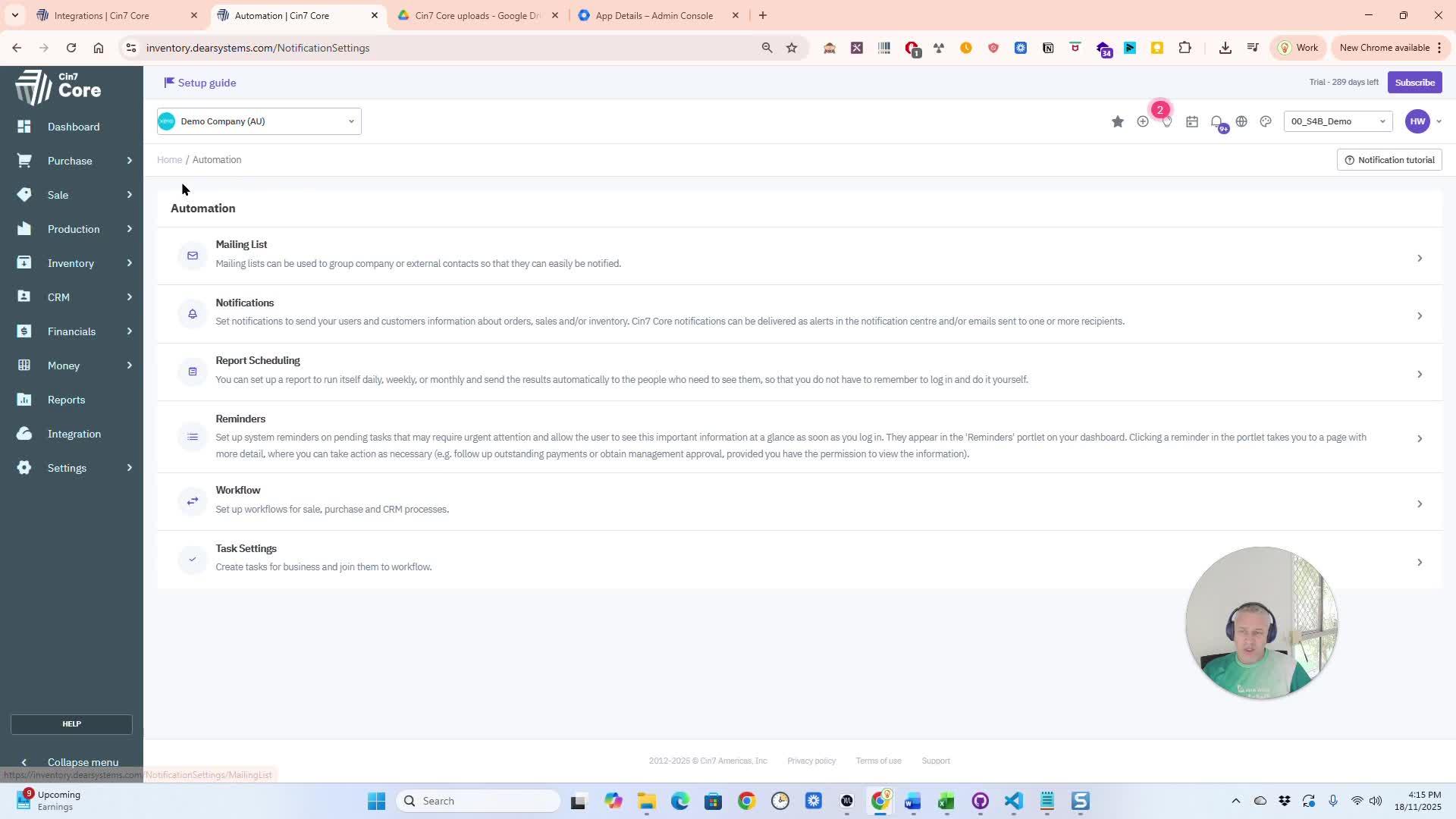
Configure Scheduled Reports
Go to 'Reporting' to find your reports. View the list of scheduled reports. Click the plus sign to add a new one.
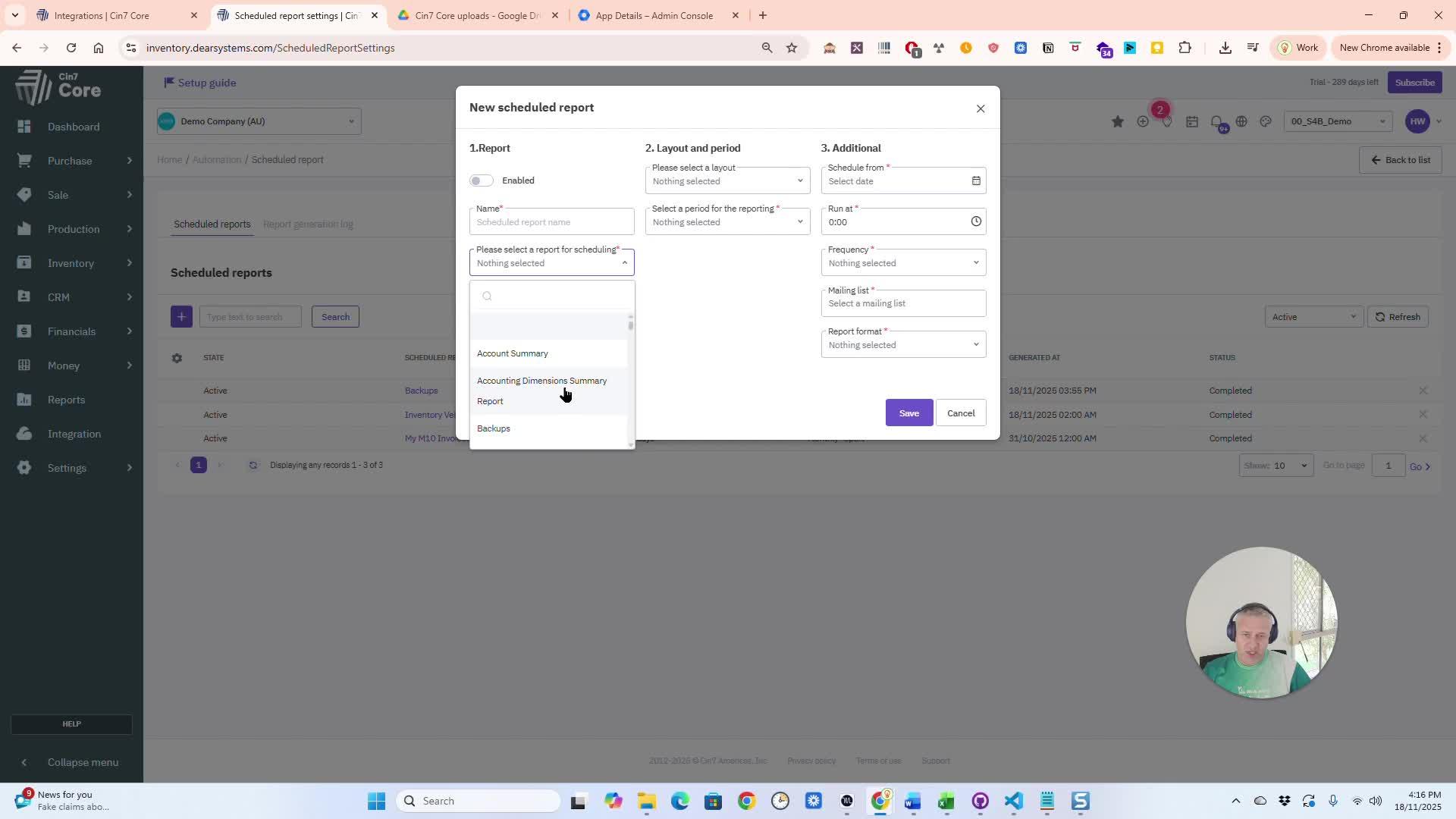
- Choose specific fields, files, or database tables to back up.
- You can select all available options if needed.
4. Set Backup Frequency and Start Time 1:01
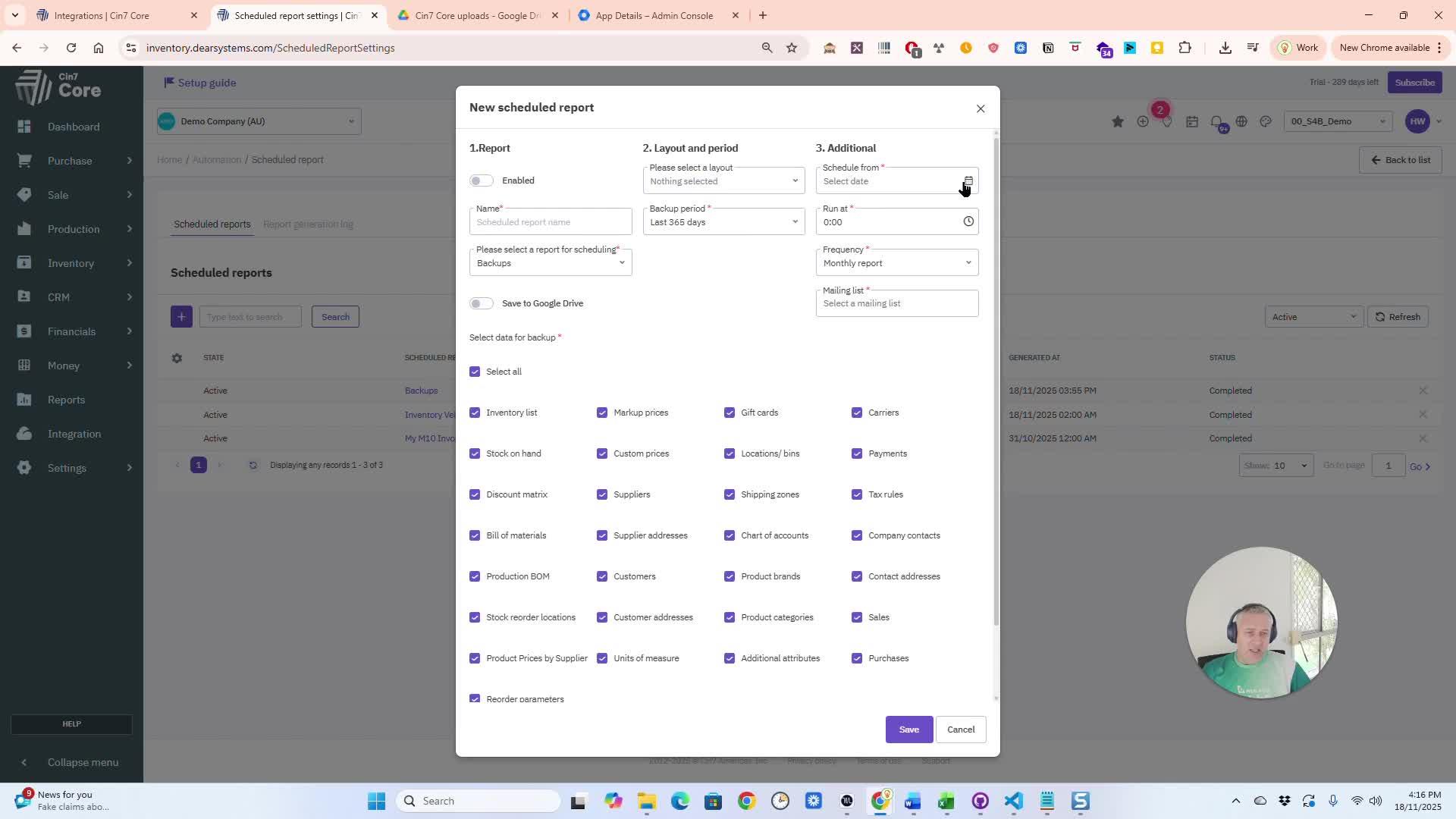
Configure Notifications
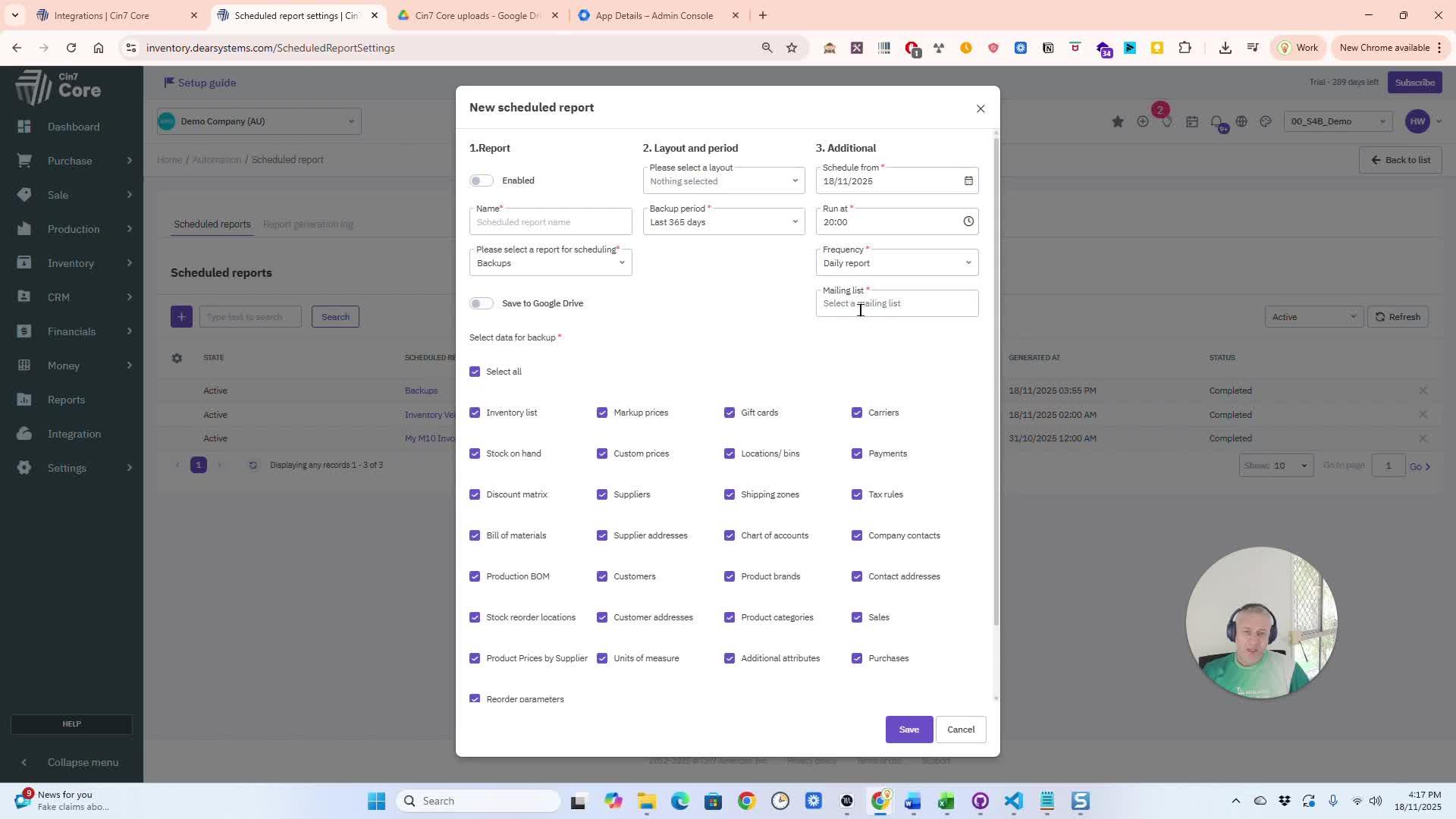
Set the backup period, like daily or monthly. Specify the start time, such as 8:00 AM.
Configure Email Alerts
Set up a mailing list under Settings to receive email notifications. Add yourself to the mailing list.
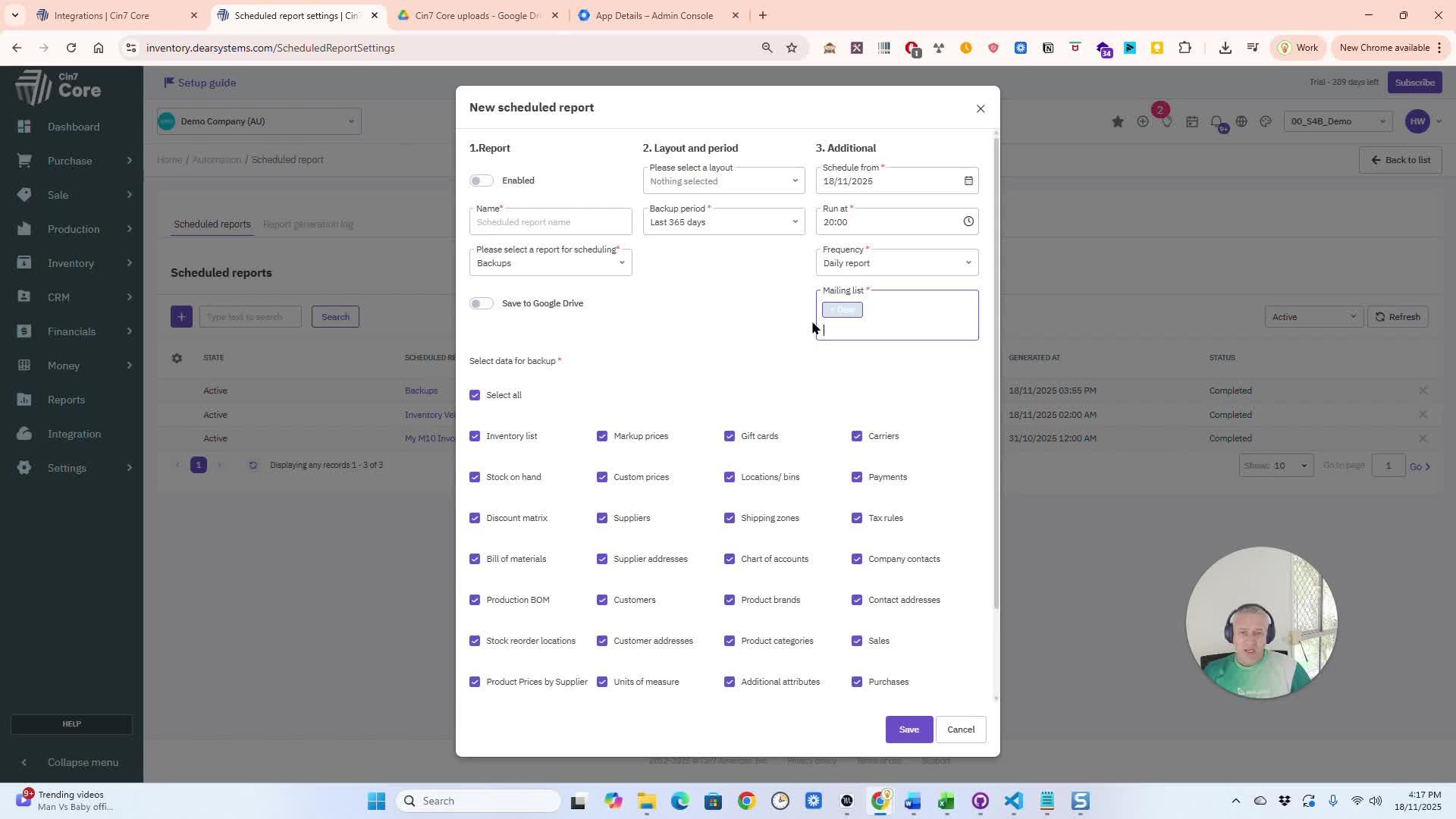
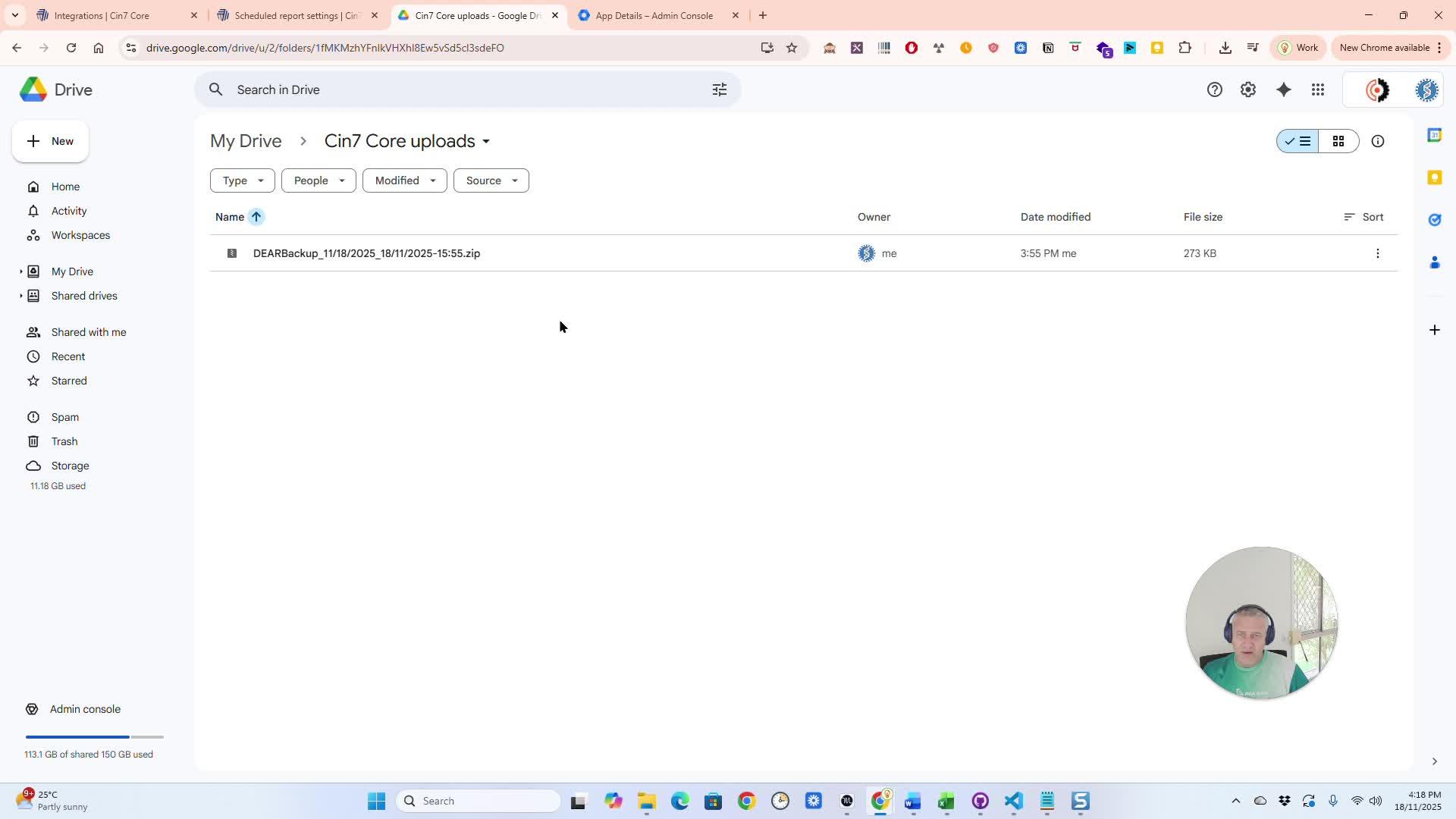
- Optionally, save backups directly to your Google Drive.
- Select the appropriate folder in your Google Drive for the backups.
7. Name and Finalize Backup Settings 2:00
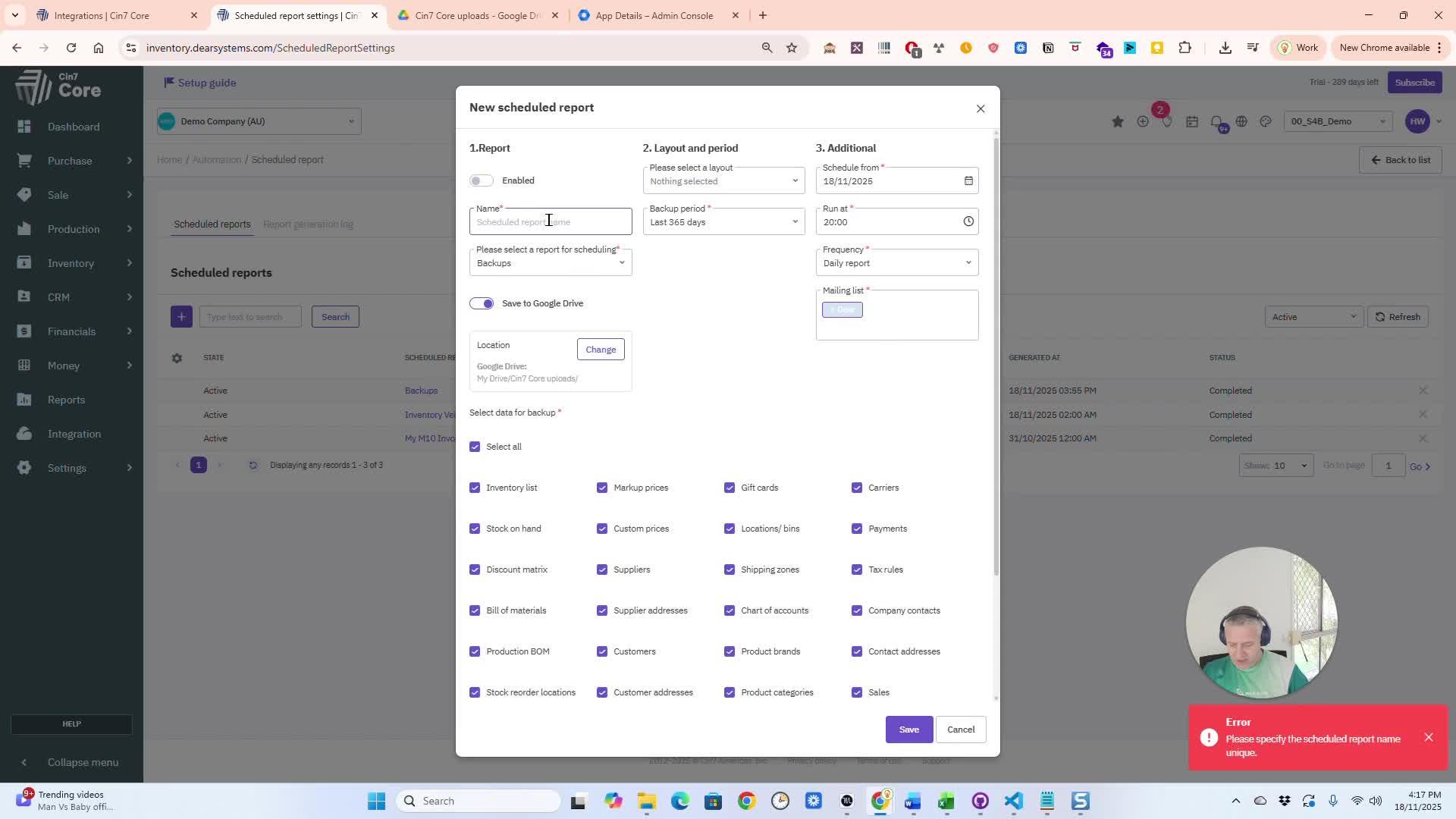
Name your backup for quick recall.
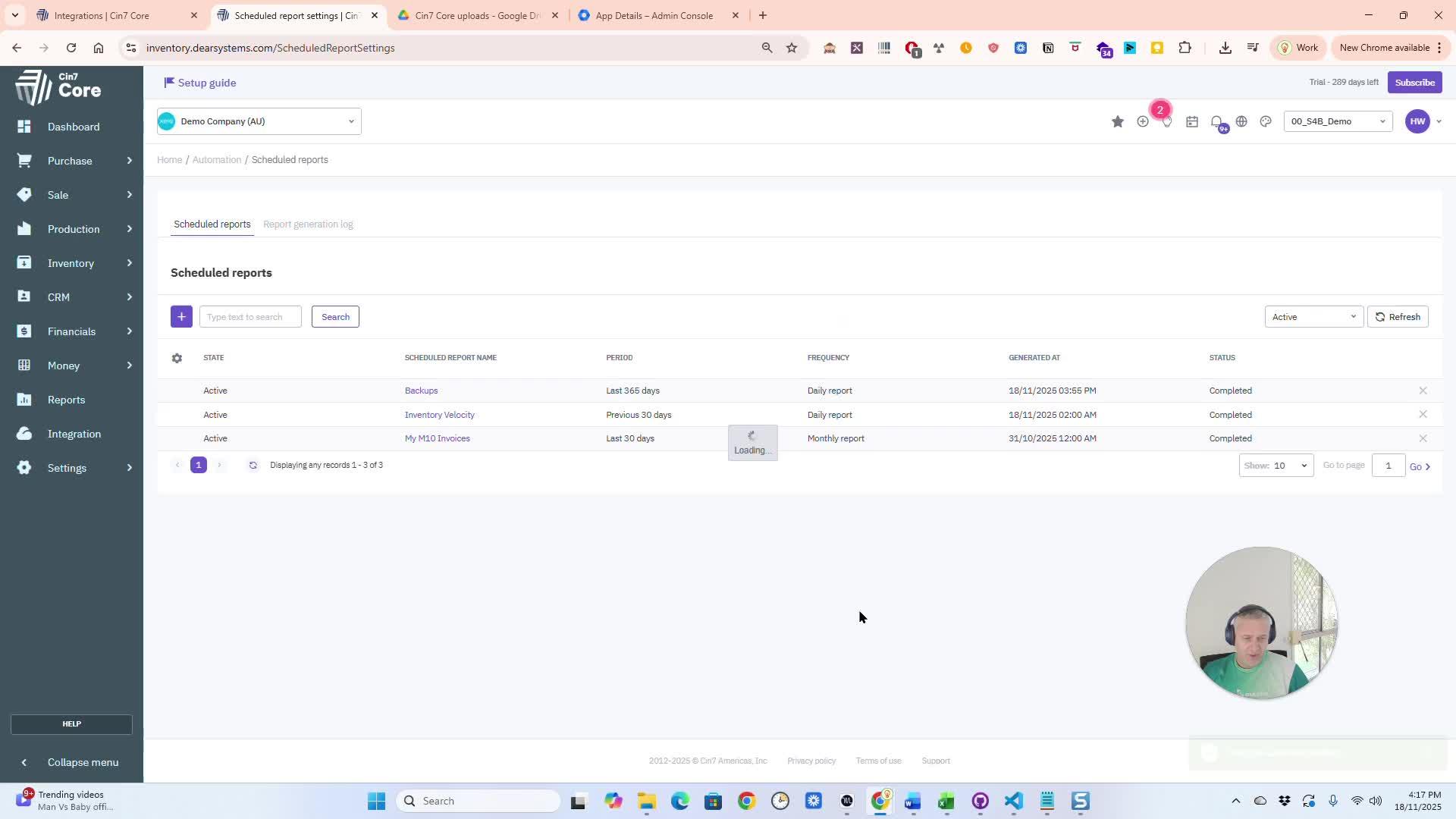
Review the backup progress in just moments.
Access Backup Files
After the backup runs, you will receive a notification email. The email will confirm that the backup is ready for download and may include an attachment.
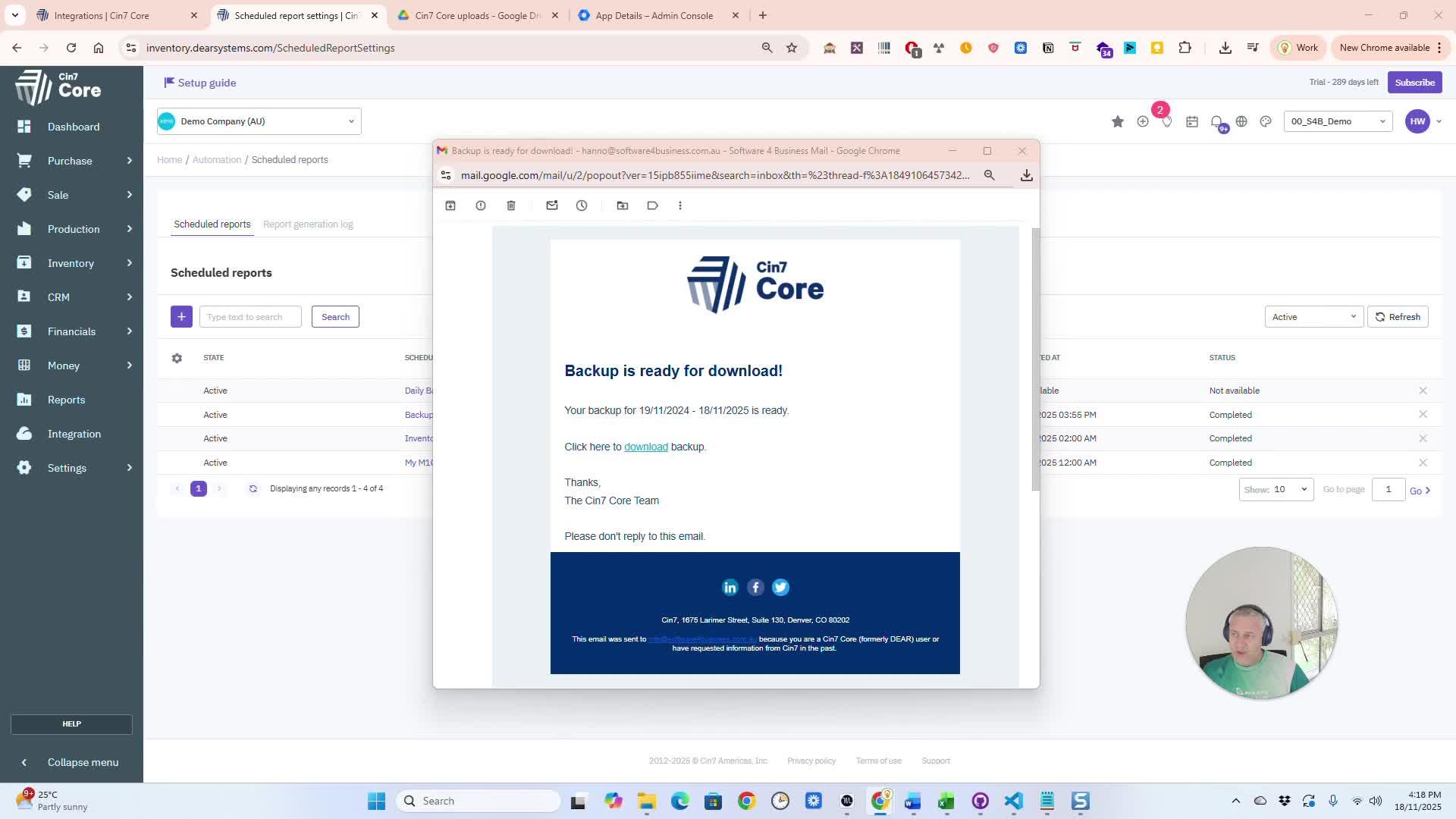
You can download the backup files from the email or access them in your Google Drive.
10. Set Up Google Drive Integration (if needed) 3:03
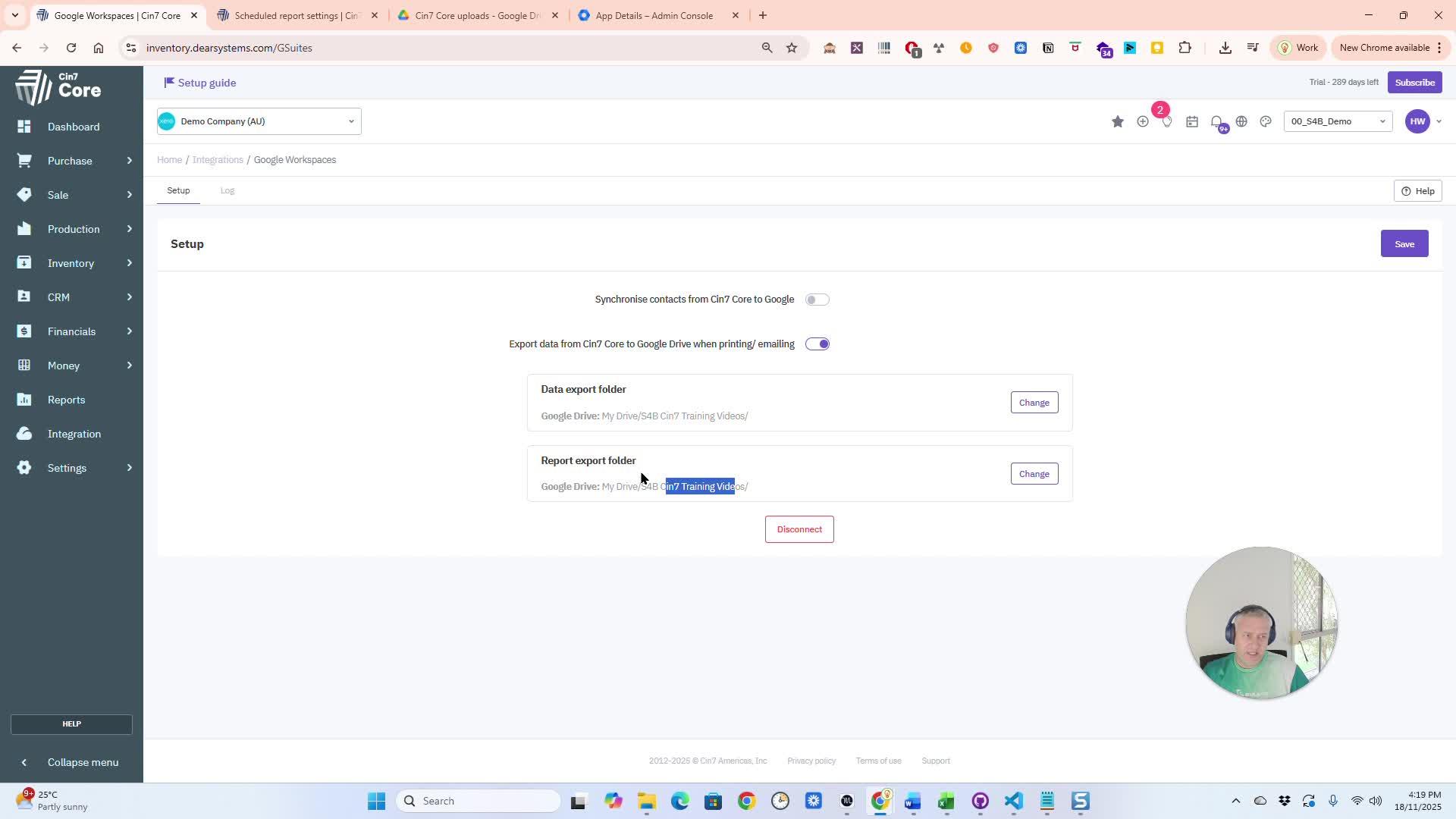
Integrate with Google
Go to Integrations and search for Google. Connect your Gmail account and select folders for backup.
Customize Backup Options 4:08
Check for logs or notifications to confirm when backups are completed.
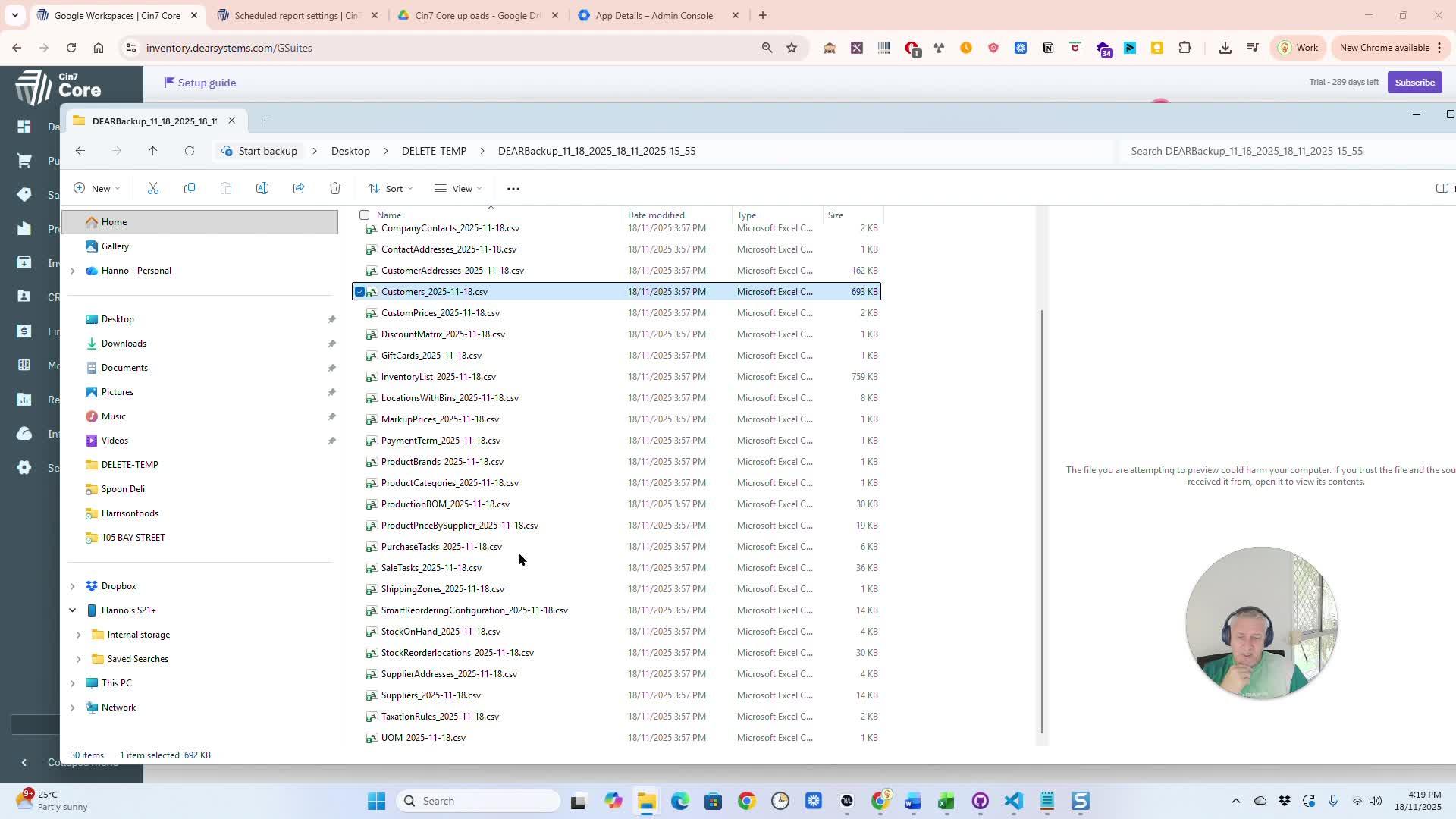
Advanced Backup Configuration
Review and adjust which tables or data you want to include in your backups.
Backup Sensitive Data Securely
If you have questions or need assistance, reach out for help.
In Summary:
Overview
This pull request introduces a new feature for backing up sensitive data within the application. Key highlights include:
- Backup Module Activation: Users can activate the backup module from the settings menu.
- Report Scheduling: Users can schedule reports for backup, selecting specific fields, files, or database tables.
- Flexible Scheduling Options: Users can set the frequency of backups (daily, weekly, monthly, etc.) and specify start times.
- Email Notifications: Users can opt to receive email notifications with backup results and download links.
- Google Drive Integration: Users can save backups directly to their Google Drive, with options to select specific folders.
Assumptions
- Users have access to the settings and automation module.
- Users are familiar with scheduling reports and setting up email notifications.
- Users have a Google account for integration with Google Drive.
Testing Strategy
Verify that the backup module can be activated from the settings menu. Test the scheduling functionality to ensure reports can be scheduled correctly. Check that email notifications are sent upon backup completion. Validate the Google Drive integration by saving backups to a specified folder.
Cin7 Core Unlocks Business Potential Cin7 Core is the Ultimate Inventory and Order Management Solution
In today’s fast-paced market, the right inventory and order management system isn’t just a tool—it’s a game-changer. Cin7 Core stands out as a comprehensive solution designed to simplify complex processes, enhance efficiency, and empower businesses to scale seamlessly.
Whether you’re in retail, wholesale, or manufacturing, Cin7 Core provides the robust functionality you need to manage and expand your operations effectively. With its user-friendly interface and powerful features, Cin7 Core is more than just software—it’s your partner in achieving sustainable growth.
Why Cin7 Core?
Businesses today face numerous challenges, from managing multi-channel sales to keeping accurate stock levels across various locations. Cin7 Core addresses these issues head-on, offering a real-time view of your inventory wherever it’s located—be it in a warehouse, in transit, or on store shelves.
This system not only supports growth but also adapts to changing business needs, making it an invaluable asset for any forward-thinking company. Whether you’re looking to streamline processes, reduce manual errors, or ensure your stock aligns with customer demand, Cin7 Core has the tools to make it happen.
Partners and references

Statistical Impact of Cin7 Core:
- 125+ million orders processed annually
- 8,000+ businesses powered by Cin7
- $35+ billion in gross merchandise value managed
These figures aren’t just numbers; they represent the vast potential Cin7 Core has unlocked for businesses worldwide. Each statistic underscores the confidence businesses place in Cin7 Core to handle their most critical operations.
Real-World Success Stories:
Meghan Fabulous
: This women’s fashion brand has experienced exponential growth, expanding 18 times in size within five years, largely thanks to the scalability and efficiency provided by
Cin7 Core
Every order and inventory item is meticulously managed through Cin7, allowing the brand to meet customer demands swiftly and accurately.
Titan RV & Redfoot Levelling
: With the support of Software4Business and the implementation of Cin7 Core, Titan RV has revolutionized its operations, leading to significant growth and the development of new brands like Redfoot Levelling.
This transformation is credited to the powerful, flexible tools and the expert setup and support from industry professionals.
Key Features of Cin7 Core:
- Multi-Channel Integration: Seamlessly manage sales and stock across e-commerce platforms, marketplaces, and brick-and-mortar stores.
- Real-Time Inventory Management: Always know your stock levels, costs, and locations to prevent overstocking or stockouts.
- Advanced Reporting: Gain insights into sales trends, inventory health, and customer behavior to drive informed decision-making.
- Warehouse Management: Streamline operations with efficient tracking, picking, and shipping processes.
- Automated Reordering: Maintain optimal stock levels with automated alerts and reorder points.
These features make Cin7 Core a powerful ally in managing even the most complex operations. Its flexibility and scalability ensure it can grow alongside your business, adapting to your unique requirements.
Transformative Benefits:
Businesses using Cin7 Core don’t just survive—they thrive. They report:
- Improved inventory turnover: Avoid stockouts and overstocking with accurate data.
- Reduced operational costs: Eliminate manual processes and errors to save resources.
- Enhanced customer satisfaction: Meet customer demands with faster and more accurate order fulfillment.
Implementing Cin7 Core means no more manual inventory counts, reduced errors, and a significant decrease in wasted time and resources. It’s the ultimate solution to keep your business running seamlessly.
Client Testimonials:
Hear directly from our satisfied clients who’ve seen the transformative power of Cin7 Core:
- MJ Nutman of Samson Medical Technologies: “Simply amazing… from scope to live in less than three weeks. Exceeded our expectations on all levels.”
- Rick Barker of Pacific Fittings: “The best software implementation and support we’ve ever had. Made complex operations seamless and easy.”
Why Partner with Software4Business for Cin7 Core?
Choosing the right partner for implementation is just as important as selecting the right software. At Software4Business, we specialize in delivering tailored solutions and expert support to ensure that your Cin7 implementation is seamless. From initial setup to data migration and training, we’ll guide you every step of the way, reducing downtime and ensuring your team is equipped to fully leverage the system.
Conclusion:
Cin7 Core is not just software—it’s a strategic partner in your business growth. By integrating Cin7 into your operations, you align yourself with a solution that is poised to handle whatever the future brings. Ready to see how Cin7can transform your business?
Contact us today for a demo or consultation, and join the ranks of companies achieving more with Cin7. Visit our website to schedule a personalized demo and see how we can help streamline your operations and boost your bottom line.
It’s time to manage less, connect everything, and scale smarter with Cin7.
You can find more articles like this on our other
website
For more articles of Cin7 on this website,
click here
If you want to explore other solutions feel free to also visit:
DearSystems
or our Odoo website called prodoo.com.au
Titan RV: Navigating Growth
Titan RV, led by Ashley Gill and Andrew Smith, has seen significant growth due to strategic use of Cin7 Core’s inventory management by Software4Business.

Cin7 Core Features You Would Definitely Love.
Explore the power of Software4Business and Dear Systems for your business.

Embracing Efficiency with Cin7 Core
Hello again, efficiency experts! Let's explore Cin7 Core, the evolution of DEAR Systems, and a game-changing feature. Cin7 Core redefines business efficiency. Our focus today is the ‘Awaiting Approval’ status filter.
Cin7 Core awaiting approval

Introducing the ‘Awaiting Approval’ Status Filter – A Revolutionary Feature in Cin7 Core
In this era of relentless innovation, Cin7 Core unveils the ‘Awaiting Approval’ status filter. This newly launched feature is engineered to drastically alter how you oversee your sales and purchases. A feature that was once solely accessible when Core to Core Networking was enabled, is now ready for action irrespective of the status of order or quote approval.
Breathing Life into Sales and Purchase Modules with the ‘Awaiting Approval’ Status Filter
A Paradigm Shift in Sales and Purchase Management
Visualize the convenience of efficiently segregating your sales and purchases based on their ‘Awaiting Approval’ status.
This innovative update isn’t just a feature change; it’s a paradigm shift that guarantees a fluid and hiccup-free workflow, proving to be a boon for all Cin7 users!

Simplifying Cin7 Login and Quote Approval with Intuitive Design
Rolling Out the Red Carpet for the ‘Awaiting Approval’ Status Filter
Before you leap to harness the power of this novel feature, some prerequisites require your attention. Start by logging into your Cin7 account. Once inside, enable quote approval by navigating to ‘Settings’, selecting ‘General settings’, then proceeding to ‘Sale process customisation’ or ‘Purchase process customisation’.
cin7 core-awaiting-approval-step-by-step

Configuring User Access Rights in Cin7 Core
For the ‘Awaiting Approval’ filter to function, it is imperative to set user access rights accordingly. Essentially, the approval setting must be disabled. If this sounds complex, don’t worry! Cin7 Help, available through Cin7 Academy, can guide you through this process, ensuring a smooth transition.
Unleashing the Full Potential of Cin7 API
Harnessing the Power of the ‘Awaiting Approval’ Status Filter
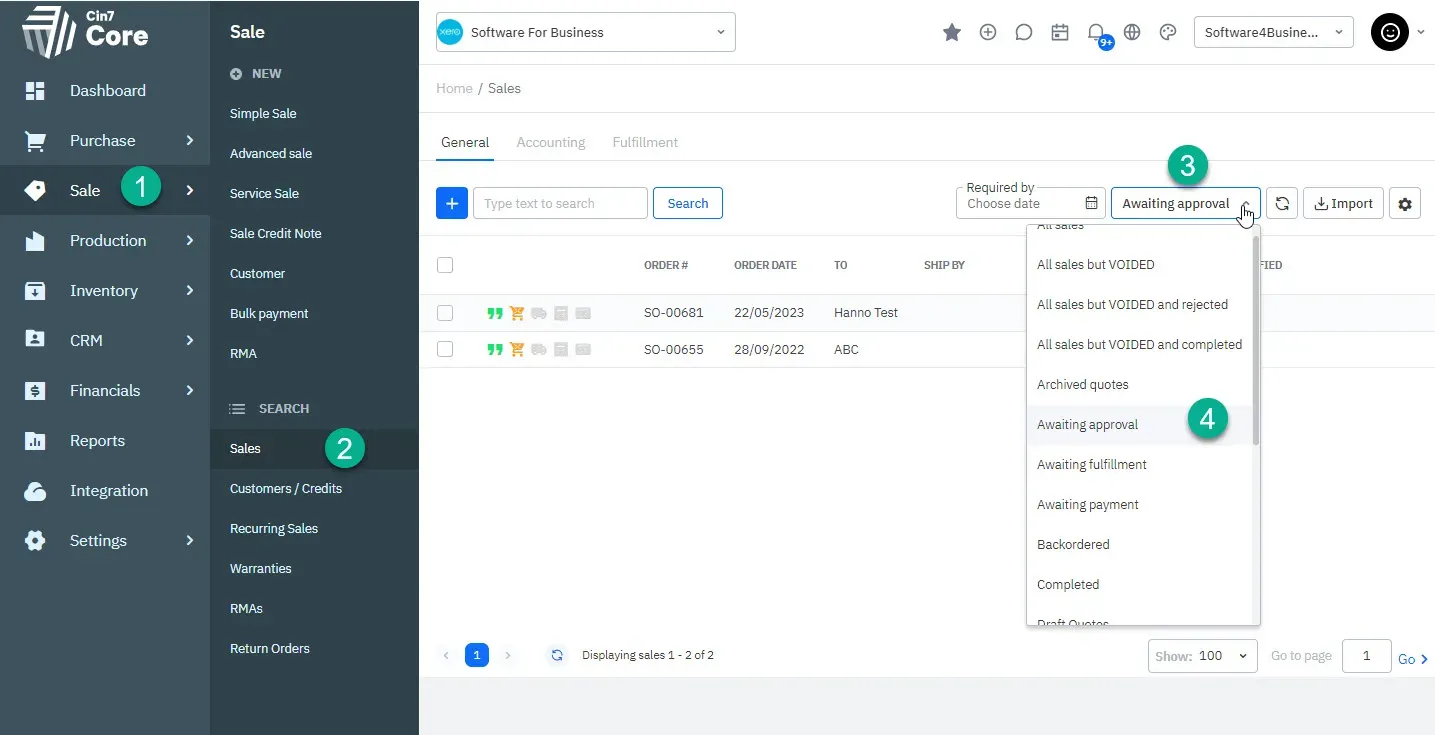
The functionality of this feature is simple yet robust. The ‘Awaiting Approval’ status can be selected from the status filter dropdown menu when examining your sales or purchase list. This addition significantly simplifies the tracking of your orders awaiting approval, thus enhancing your control over the sales and purchase processes.
Where the filter will be exactly

The Cin7 Omni Experience – An Example Workflow
Utilizing ‘Awaiting Approval’ Status Filter in Real-time
To illustrate the practical application of this feature, consider this workflow scenario: When logged in with a limited user account, the creation of a Quote enables its Authorisation. However, an additional layer of approval is still required. This sales order or quote now becomes visible in the list of items requiring approval, making it easy for managers to swiftly locate and approve or reject orders.
Approve or Reject with Ease Using Cin7 Core
Cin7 Core’s comprehensive design also allows you to approve or reject an order using the mass action menu when listing orders. The API ensures that these processes run seamlessly, adding to the charm of this versatile feature.
Conclusion: Elevate Your Business with Cin7 Core
From Dear Cin7 to Cin7 Core: A Journey Towards Process Excellence
Our journey from Dear Systems to Cin7 Core is laden with innovations like the ‘Awaiting Approval’ status filter, tailored to smoothen your workflow. As we walk into the future together, we’re excited for the limitless possibilities Cin7 Core opens up for your business. Remember, the key to success lies in innovation and productivity.
Software4Business – Your Companion in the Digital Journey
For any assistance in your journey towards process efficiency, don’t hesitate to reach out to Software4Business. And, until our next update, continue to innovate and strive for efficiency.
For similar post related to Odoo, please go to our new Odoo site Prodoo
Cin7 Cin7 Core Cin7 Expert Consultants Cin7 Support Dear Expert Dear Inventory Dear Systems Filtering Xero inventory
HubSpot CRM and Cin7 Core: How to Easily Connect HubSpot with Dear Systems

It is common for us to be asked this question: “Does Cin7 Core work with HubSpot?”
Yes, Cin7 Core (aka Dear Systems) integrates with HubSpot.
How to Connect Dear Systems to HubSpot CRM
Are you tired of manually transferring data between your Dear Systems and HubSpot CRM? You’re in luck, because in just a few simple steps you can easily connect the two systems and streamline your data flow. Let’s get started!
What is HubSpot CRM?
HubSpot CRM is a best-in-class customer relationship management tool that can help your business with marketing, sales, and service delivery, enabling your business to grow without compromise.
Connecting Dear Systems to HubSpot CRM
To begin the integration, log in to your Dear Systems account and go to the Integrations tab. Search for HubSpot CRM and click on Connect. Make sure to have your HubSpot account open and select the correct account if you have more than one.
Enable Synchronization
Once you have clicked on Connect, you will be prompted to enable synchronization. This will allow you to update sales, products, and customers between the two systems. You can specify the direction of the updates, whether you want to import from or export to HubSpot. You can also choose to force updates on HubSpot entities. However, it is recommended to disable the force DEAR entity update setting to prevent errors.
Custom Field Linking
Dear Systems and HubSpot CRM custom fields can be linked to streamline your data flow. This integration can be easily managed within the Dear Systems integration tab.
Error Management
If any errors occur, don’t worry. Simply go to the log tab where you can download an Excel file and investigate potential issues.
Marketing Campaigns
With this integration, your marketing team can create targeted campaigns in HubSpot CRM based on customer data from Dear Systems. This will help improve lead generation and customer engagement.
Connect Today!
Now that you know how to connect Dear Systems to HubSpot CRM, what are you waiting for? Take your business to the next level with this streamlined integration.
Support
If you run into any issues with the integration or have any questions, don’t hesitate to reach out to our support team here at Software4Business.
At Software4Business, we’re here to help you get the most out of your systems and optimize your business processes.
Subscribe to our Youtube channel for more tips and tutorials or sign up for our newsletter today or simple just contact Software4Business support.
Get Real Help with one of our Expert Consultants
Software4Business is a consulting firm specializing in Cin7 and Cloud CRM, two of the most powerful and flexible business management systems available.
With extensive experience and expertise in both systems, the team at Software4Business can help businesses of all sizes streamline their operations and improve your bottom line.
Whether you are looking to implement a new business management system, integrate with other platforms, or simply need assistance with a specific feature, Software4Business has the expertise to help you succeed.
Their team of experienced consultants can help you navigate the complex world of inventory management and provide tailored solutions that meet your specific needs.
If you are interested in learning more about how Cin7 Omni or Core and HubSpot CRM can help you grow your business, or if you need assistance with implementation or integration, don’t hesitate to reach out to Software4Business. With our 20+ years of experience and commitment to customer success, we are the perfect partner to help you take your business to the next level.
So if you’re looking for a reliable, experienced consulting firm to help you get the most out of your investment in Cin7 Omni or Core, look no further than Software4Business.
Contact us today to learn more about how they can help you achieve your goals.
Explore our integrations
Learn how to connect and manage Cin7 Core with Shopify for streamlined operations.
Connect Shopify with Cin7
Learn about integrating Shopify with Cin7 Core / Dear Systems. Improve your customer experience, engage with your leads and boost your sales.

It is common for us to be asked this question: “Does Cin7 work with Shopify?”
Yes, Cin7 Core (aka Dear Systems), Cin7 Omni, and Cin7 Orderhive work with Shopify.
Cin7 is an all-in-one inventory management platform that integrates with Shopify to provide a seamless and streamlined experience for online retailers.
Cin7 Core is the backbone of the Cin7 products, providing a centralized platform to manage inventory, purchase orders, sales, and shipping across multiple channels. Cin7 is simply, really good.
Cin7 Omni expands on the core functionality by adding support for omnichannel sales, allowing retailers to manage sales across multiple sales channels from one central platform.
Cin7 Orderhive, on the other hand, is a standalone app that integrates with Shopify to manage order fulfillment. With Cin7 Orderhive, retailers can automate order processing, manage inventory levels, and monitor shipping information in real-time. This integration allows retailers to manage their entire order process from a single platform, reducing manual work and minimizing errors.
Key Benefits for connecting with Shopify are:
One of the key benefits of integrating Cin7 with Shopify is the ability to keep inventory levels up-to-date across all sales channels in real-time. This helps to ensure that retailers never oversell products, and can reduce the risk of stockouts. Additionally, the integration allows you as a retailers to automate order processing, saving time and reducing manual work.
Another benefit of Cin7 is its robust reporting and analytics capabilities. Retailers can use the platform to gain insights into sales trends, inventory levels, and shipping information, helping you to make informed business decisions. With Cin7, retailers can also create custom reports, allowing you to track the metrics that matter most to your business.
In conclusion, all these products are powerful business software that can help online retailers using e-commerce platforms to streamline your operations and grow your business. With its integration with Shopify, Cin7 provides a seamless and centralized platform to manage inventory, sales, and shipping, saving time, reducing manual work, and minimizing errors. And that is worth a lot in todays online business environment.
How to Connect with Shopify
Connecting the two systems can either be done through Dear or Shopify. The settings configuration is done in DEAR.
Following this easy step-by-step guide below to help you set up this integration:
- Set up your Account: Create an account on Dear Systems, please click here to get a month free trial, if you do not have an Account Setup already.
- Shopify login: Log in to your online store account and go to the app store. Search for the “Dear Inventory” app and install it.
In the future (after June 2023 -Search for Cin7 Core if Dear Inventory is not showing anything anymore)
- Install the Cin7 Core (Or Dear Inventory) app in Shopify
- After installation, you will be directed to the Cin7 Integrations Shopify dashboard. From there, you will need to configure the new connection.
- Once your setup is done, sync the items from Dear to Shopify or from Shopify into Dear.
- To download products from Shopify into DEAR simply click the “Catalog” button and click on the “Download” button.
- Once products have been created, synced and listed, you can start importing new orders from Shopify into Cin7 Core.
- To import products, go to “Pending Order” in the Shopify Dear Integration interface and click on > “Load orders”. New orders will now be listed in the pending order grid.
- To process the orders into your sales process flow, click on the Process button.
- To see import orders, you can view them in the go to “Sales” > “Search sales”. The new sales will be the latest orders added.
- To keep your product and order information up-to-date, the order import process is automated. No manual intervention is required.
- If you want to integrate your shipping, we suggest you set up shipping rates in Shopify. Go to “Settings” > “Shipping and delivery” in the Shopify Admin to set up your shipping rates.
- Finally, to take advantage of the full range of features offered by the Cin7 products, you may want to set up custom integrations with other platforms and services. For more information on custom integrations, consult the Cin7 Core documentation or contact Software4Business support.


General Setup
Customer Price Tiers Pick, Pack and Ship modes etc
Account and Cash
Invoice status Poduct Listing Stock level update status Sales Rep Discounts etc.
Tax Rules
Locations Payment methods
The bulk listing feature will also let you know if the products meet the minimum required standards for it to be listed in Shopify.

Get Real Help with one of our Expert Consultants
Software4Business is a consulting firm specializing in Cin7 Omni and Core, two of the most powerful and flexible inventory management system available. With extensive experience and expertise in both systems, the team at Software4Business can help businesses of all sizes streamline their operations and improve your bottom line.
Whether you are looking to implement a new inventory management system, integrate with other platforms, or simply need assistance with a specific feature, Software4Business has the expertise to help you succeed. Their team of experienced consultants can help you navigate the complex world of inventory management and provide tailored solutions that meet your specific needs.
If you are interested in learning more about how Cin7 Omni and Core can help you grow your business, or if you need assistance with implementation or integration, don’t hesitate to reach out to Software4Business. With our years of experience and commitment to customer success, we are the perfect partner to help you take your business to the next level.
So if you’re looking for a reliable, experienced consulting firm to help you get the most out of your investment in Cin7 Omni or Core, look no further than Software4Business.
Contact us today to learn more about how they can help you achieve your goals.
You might also like:
How do I connect my Cin7 to Shopify?
Does Cin7 work with Shopify? How do I map a product on Cin7 Shopify?
Cin7 Support – Sales Order Process Workflow
Cin7 Core Cin7 Expert Consultants Cin7 Help Cin7 Omni Cin7 Orderhive Cin7 Support Dear Expert Dear Systems Shopify

We offer Cin7 Support. Contact us for a quote.
Not that simple to understand
The Cin7 Orders screen displays sales orders that need to be picked or packed individually or in groups.
Numbers to guide you
Nevertheless, it’s not as simple as you might think. Knowing exactly what steps to take when you open a Cin7 sales order can be more challenging.
In the new system, they do provide you with numbers, so that you can follow them.
I would suggest, rather than focusing on the numbers, you should learn how to use the interface in general, as you may be confused if you don’t.
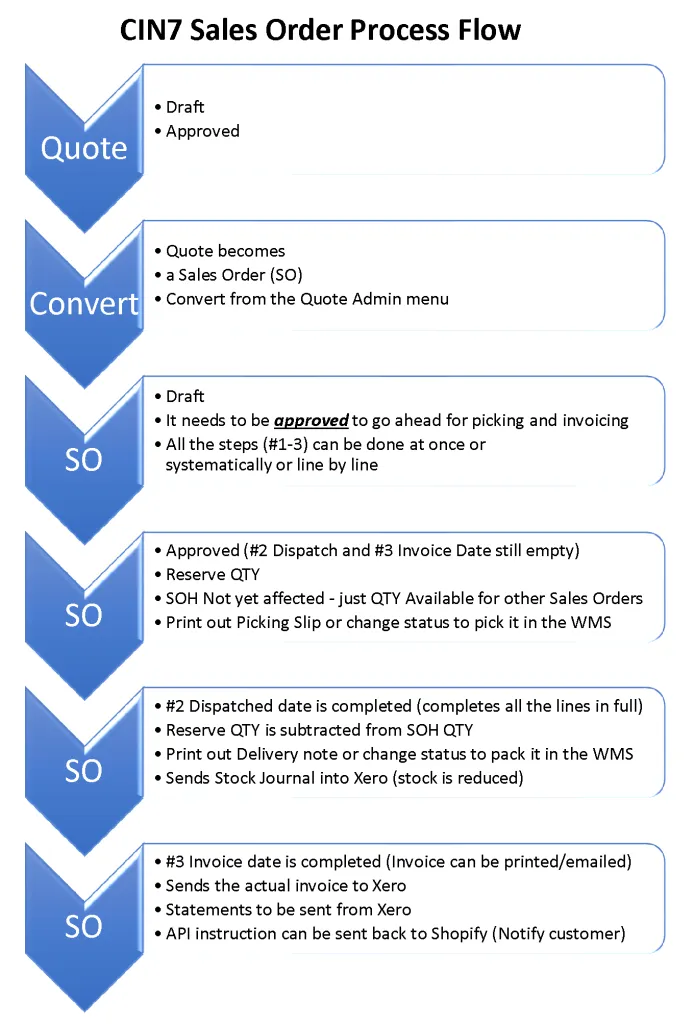
As a result, I have designed this workflow to explain how to move from a sales quote to a draft sales order and eventually a sales invoice.
You should keep in mind…that in the standard workflow, once approved the button names change from “Approve & Email” to “Save & Email”.
Apart from understanding little quirky things like that, it is also important to understand that there are statuses that can trigger interaction with external applications like Shopify or the Cin7 WMS.
Basically, stages are used when sales orders move from one stage to the next until they are fully completed.
When is what updated
Cin7 Support – Stock Management
You might also like these Cin7 Support articles I wrote
Here is a Video that might be of help.
Cin7 Process Flow – Cin7 Support.
Changing Cin7 Stock Management from FIFO to Batch.
Bringing in stock as batch qty after conversion
Security update requires Cin7 integration to be reconnected to Xero
Cin7 integration to Xero needs to be reconnected by March 4.
Continue reading Cin7 Updates Xero

1
2
3
Next
Services we offer:
Software by Business Needs

CRM Software
1. Software research / demos

Inventory Management Software
2. Process (re-)engineering

Job Management Software
3. Software implementation
FOLLOW US ON:
Software by Business Needs

Manufacturing Software
4. System integration.

Other Software
5. Onsite/Virtual Training

Odoo ERP
web: www.software4business.net
Let's Connect
Get in touch with your customers to provide them with better service. You can modify the form fields to gather more precise information.