Latest Article
Author: Admin
Go to
Home
View
Author Archives
Read It Now
Solve it today.


Elevating Efficiency with Cin7 Core
Dive into Cin7 Core, the DEAR Systems evolution, and explore its features. Balancing simplicity and complexity, it redefines business efficiency with its suite of tools.
Cin7 Core process awaiting approval

Introducing the ‘Awaiting Approval’ Status Filter – A Revolutionary Feature in Cin7 Core
In this era of relentless innovation, Cin7 Core unveils the ‘Awaiting Approval’ status filter. This newly launched feature is engineered to drastically alter how you oversee your sales and purchases. A feature that was once solely accessible when Core to Core Networking was enabled, is now ready for action irrespective of the status of order or quote approval.
Breathing Life into Sales and Purchase Modules with the ‘Awaiting Approval’ Status Filter
A Paradigm Shift in Sales and Purchase Management
Visualize the convenience of efficiently segregating your sales and purchases based on their ‘Awaiting Approval’ status.
This innovative update isn’t just a feature change; it’s a paradigm shift that guarantees a fluid and hiccup-free workflow, proving to be a boon for all Cin7 users!

Streamlining Data Entry with Smart Interface Design
New ‘Action Required’ Status Filter is now Available for Users
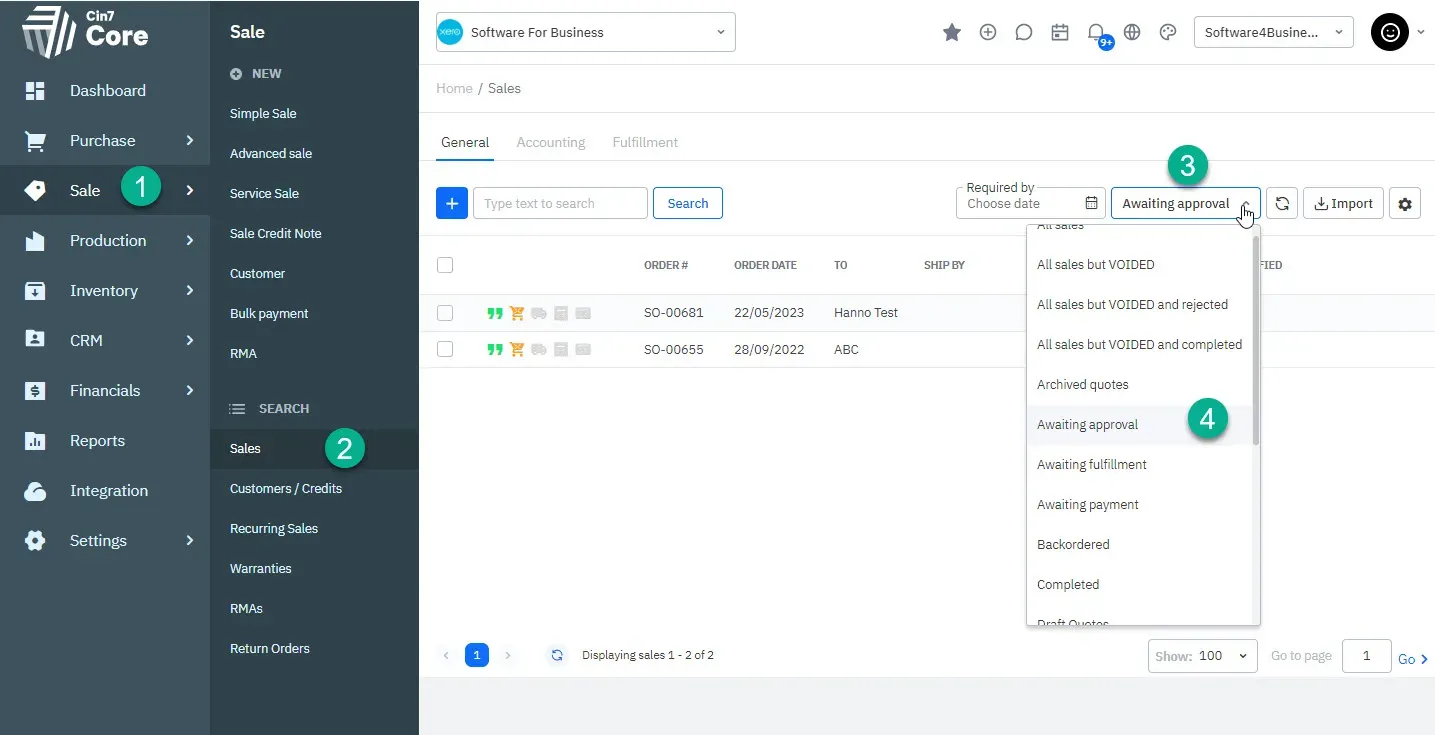
Before using this feature, some steps are required. Log into Cin7. Enable this by going to ‘Settings’, then ‘General settings’, and ‘Sales process customisation’.
cin7 core awaiting approval, follow this easy step-by-step guide to understand all the actions
required to approve the operation. Start now!

Configuring User Access Rights in Cin7 Core
For the ‘Awaiting Approval’ filter to function, it is imperative to set user access rights accordingly. Essentially, the approval setting must be disabled. If this sounds complex, don’t worry! Cin7 Help, available through Cin7 Academy, can guide you through this process, ensuring a smooth transition.
Unleashing the Full Potential of Cin7 API
Harnessing the Power of the ‘Awaiting Approval’ Status Filter
The functionality of this feature is simple yet robust. The ‘Awaiting Approval’ status can be selected from the status filter dropdown menu when examining your sales or purchase list. This addition significantly simplifies the tracking of your orders awaiting approval, thus enhancing your control over the sales and purchase processes.
See where exactly your filter will be displayed.

The Cin7 Omni Experience – An Example Workflow
Utilizing ‘Awaiting Approval’ Status Filter in Real-time
To illustrate the practical application of this feature, consider this workflow scenario: When logged in with a limited user account, the creation of a Quote enables its Authorisation. However, an additional layer of approval is still required. This sales order or quote now becomes visible in the list of items requiring approval, making it easy for managers to swiftly locate and approve or reject orders.
Approve or Reject with Ease Using Cin7 Core
Cin7 Core’s comprehensive design also allows you to approve or reject an order using the mass action menu when listing orders. The API ensures that these processes run seamlessly, adding to the charm of this versatile feature.
Conclusion: Elevate Your Business with Cin7 Core
From Dear Cin7 to Cin7 Core: A Journey Towards Process Excellence
Our journey from Dear Systems to Cin7 Core is laden with innovations like the ‘Awaiting Approval’ status filter, tailored to smoothen your workflow. As we walk into the future together, we’re excited for the limitless possibilities Cin7 Core opens up for your business. Remember, the key to success lies in innovation and productivity.
Software4Business – Your Companion in the Digital Journey
For any assistance in your journey towards process efficiency, don’t hesitate to reach out to Software4Business. And, until our next update, continue to innovate and strive for efficiency.
For similar post related to Odoo, please go to our new Odoo site Prodoo
Cin7 Cin7 Core Cin7 Expert Consultants Cin7 Support Dear Expert Dear Inventory Dear Systems Filtering Xero inventory
Cin7 Unifies its Brand with Rebranding Effort: What You Need to Know

An Important Announcement
We are excited to share some important news with you regarding a change to the Cin7 brand.
Effective January 9, 2023, Cin7 unified its product names under a single brand, Cin7.
This rebranding includes renaming Cin7 to Cin7 Omni and DEAR to Cin7 Core.
Rest assured, this transition will not impact your current product or relationship.
We appreciate your continued support and look forward to our journey together.

What type of software is Xero?
Looking to find answers about Xero Inventory management?
When it comes to accounting, Xero is exceptional online accounting software. In fact, the Xero mantra is synonymous with Xero and beautiful business. Of course, Xero is extremely powerful in terms of features and logic for calculating the GST, cost of goods sold, tracking categories, purchase order control, sales, and invoices, not to mention the excellent features for bank reconciliation and its many integration options.

Primarily Accounting Software
But it must be kept in mind that Xero is primarily an accounting software that integrates with other software via API. This allows development teams and organisations around the world to focus on their niche and do it properly without trying to solve all the problems in one solution. Have you ever heard of SAP, or Oracle? Those giants are slow to move and labour intensive to feed every day, but yes they can do quite a lot and can deal with large organisations with complex and/or unique requirements.
Inventory in Xero?
Small business owners far and wide, potentially even you, are or will be trying to use Xero inventory to run your business. Our customers typically contact us to find out how they can use Xero for accounting and inventory tracking purposes, and then once they made a little progress they run into a few roadblocks like e-commerce integration, payment reconciliation, unique pricing, stock code and description management, customer-specific pricing and stock take issues to name but a few.
Growing industry
More and more retailers, wholesaler and distribution companies, especially as they grow, get to grips as to how important stock control and real time tracking is, but often fails to understand where, if at all, their Xero account is capable of handling their various inventory management requirements.
Managers know what they want.
Now, we acknowledge that Xero inventory management is a thing, but it has limited capabilities, especially when comparing Xero inventory management with the likes of Dear Inventory, for example. Xero inventory management, unfortunately, lacks all the OOMPH and more tricky but necessary components business managers want.
Consider stock takes and inventory adjustments for example, or purchase orders with batch numbers or expiry dates. What about multi-location and tracking serial numbers. Not to even mention barcode scanning stock in and out or selling those items via eBay, Amazon or Shopify and let it automatically link to Courier companies when it needs to be delivered. So in short, if you ever even thought about using barcode scanners in your business, then Xero must make room for a specialised add-on module. Oh, and don’t even think about running a warehouse full of stock with just Xero. No.
Not doing stock control is dangerous.
Stock Control is a specialised task, and it should not be limited to rights reserved Xero and beautiful excel files. That is just plain dangerous as many Excel versions will be floating around and it will end up being 20 times more labour intensive than a proper solution, guaranteed. In the realm of specialized cloud-based systems, Xero is an amazing accounting software program, but there is a reason it promotes its accounting functionality. You need something better to manage your stock, and online sales.
Beautiful Dear Inventory
Dear Inventory however and beautiful business are trademarks, not just for Xero anymore, but for almost everyone who uses Dear. People swear by the amazing integration capabilities of Dear Inventory and Xero (or Quickbooks) and how their new business software (aka Dear Inventory) and the way they do business is not limiting anymore. Rather Dear Inventory allows and promotes small businesses to grow exponentially in sales and revenue into large corporations and even then, can still cater for complex scenarios. We have clients with annual revenue of over 100 million dollars running on Dear Inventory.
Why you should not really bother with inventory in Xero?
So even though Xero is great for real time accounting software with simple steps to generate invoices, for example, it really offers little when it comes to inventory management. Software4Business recommend that you start using Dear Systems as your business operating software as it fully integrates back into Xero anyway. This will give you the best of both worlds. Best in accounting and best in stock control. Give us a call, we work with Dear Inventory all day, every day and have converted and implemented Dear projects for many businesses in Australia.
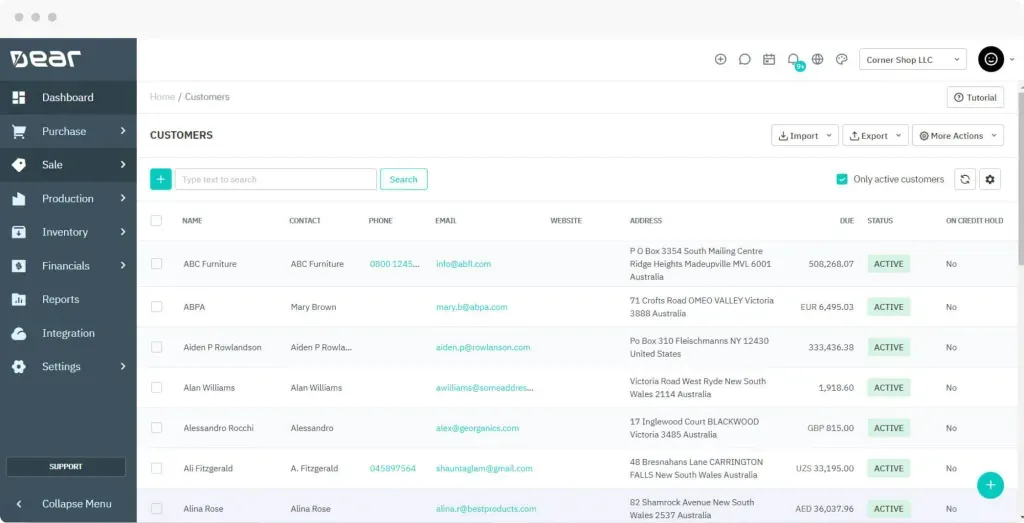
Manage Customers
More links
Dear Expert Dear Inventory Dear Systems Xero Xero inventory Xero Inventory mangement
More Details
Dear Systems Training #1

How to setup product feeds between Shopify or WooCommerce and Dear Systems
- Setting to update Category / Brand <-> Dear / WooCommerce
- Setting to change QTY globally or individually
- Never change too much in WooCommerce (Dear will handle that)
- Descriptions can be pulled from WooCommerce and update Dear
- Leave the pretty interface changes and images for the web-developer
Dear’s Product Descriptions and SKUs can be changed but needs to be manually synced to WooCommerce.
- Via the item self
- Via the integration interface
- Qty and Price changes happens automatically
- Push Qty and Price changes to WooCommerce
The benefits of integrating Dear Systems with WooCommerce and/or Shopify
- Stock levels are automatically updated from DEAR systems to WooCommerce and/or Shopify
- DEAR inventory then allows online orders to be Picked, Packed, Shipped and Fulfilled
- Order information can be synced with your shipment applications to create manifest
- Dear inventory then sync inventory costs and movements to Xero or Quickbooks
- This means one integrated/centralised inventory management to manage all channels of sales
A list of the types of data that are exchanged between Dear Systems and Shopify and/or WooCommerce
- Downwards -> Orders and additional charges
- Both ways of making payments (setting)
- Both ways of new products (setting)
- Upwards -> DEAR to WooCommerce/Shopify stock quantities
- Downwards -> Customers
An example of what happens when you integrate
- The existing products can be downloaded from WooCommerce or Shopify, or listed/uploaded from DEAR
- Each sale from WooCommerce/Shopify will first go into Pending Sales, where stocks will be allocated
- Consolidation of online sales for the day can be enabled (settings)
- Changes to stock levels are pushed from DEAR SYSTEMS back to WooCommerce / Shopify
It is important to take note of what does not integrate
- Stock quantities are not imported automatically from WooCommerce to DEAR and need to be set in DEAR.
- It is recommended to ensure the quantities are the same on both platforms before you start.
Other useful links to CIN7 and DEAR systems training you might like:
Dear Systems Academy
DEAR/Xero Integration
DEAR Systems, Shopify, WooCommerce, Xero inventory management.
Services we offer:
Software by Business Needs

Software research / demos
Process (re-)engineering

Software implementation
System integration.

Onsite/Virtual Training
Select and delete blocks to remove features.
FOLLOW US ON:
Contact Detail

42 Cin7
183 Cin7

112 Cin7
Implementations

Users Trained
Integrations Set Up
Let's Connect
Get in touch with your customers to provide them with better service. You can modify the form fields to gather more precise information.